Running Carrot-Transform with Docker
Carrot-Transform is available as a Docker container image, which makes it easy to run without installing Python dependencies locally. The container includes test data, so you can get started quickly by only mounting an output directory.
Pull the Container Image
The container image is published to GitHub Container Registry. Pull it with:
docker pull ghcr.io/health-informatics-uon/carrot/transform:edgeThe tag edge is the latest version of the container image.
Version Pinning: We recommend that you pin to a specific version of Transform for production use to ensure consistent behavior and avoid unexpected changes from updates.
For a specific version, check available tags at the container registry.
Understand Docker Command Flags
Before running the container, it’s helpful to understand the Docker flags used:
-v: Mounts a volume (directory) from your host machine into the container- Format:
-v <host-path>:<container-path> - This allows the container to read from and write to files on your machine
- Format:
$(pwd): Shell command that expands to your current working directory- Example: If you’re in
/Users/John-Doe/Documents/carrot, then$(pwd)/outputbecomes/Users/John-Doe/Documents/carrot/output
- Example: If you’re in
In the examples below, -v $(pwd)/output:/app/output mounts a local output directory (created in your current folder) to /app/output inside the container, allowing you to access the transformed files on your machine.
The container includes test data and example mapping rules, so you can run Transform immediately without providing input files.
Running V1 JSON Mapping Rules with Docker
The following example shows how to run the V1 transformation process using Docker. V1 process of Transform uses the run mapstream command and takes V1 JSON mapping rules from Carrot Mapper.
Run V1 with a volume mount so you can access the output files on your host machine:
docker run -v $(pwd)/output:/app/output \
  ghcr.io/health-informatics-uon/carrot/transform:edge \
  uv run -m carrottransform.cli.command run mapstream \
    --inputs /app/carrottransform/examples/test/inputs \
    --rules-file /app/carrottransform/examples/test/rules/v1.json \
    --person Demographics \
    --output /app/output
After running the command, you will see output similar to:
Building carrot-transform @ file:///app
      Built carrot-transform @ file:///app
Uninstalled 1 package in 39ms
Installed 1 package in 12ms
2025-12-17 17:43:13,947 - carrottransform.tools.logger - INFO - /app/carrottransform/examples/test/rules/v1.json,w,/app/carrottransform/config/OMOPCDM_postgresql_5.4_ddl.sql,/app/carrottransform/config/config.json,5.4,N,None,0
2025-12-17 17:43:13,952 - carrottransform.tools.logger - INFO - Detected v1.json format, using legacy parser...
2025-12-17 17:43:13,952 - carrottransform.tools.logger - INFO - --------------------------------------------------------------------------------
2025-12-17 17:43:13,952 - carrottransform.tools.logger - INFO - Loaded mapping rules from: /app/carrottransform/examples/test/rules/v1.json in 0.00454 secs
2025-12-17 17:43:13,962 - carrottransform.tools.logger - INFO - Headers in Person file: ['PersonID', 'sex', 'date_of_birth', 'ethnicity']
2025-12-17 17:43:14,032 - carrottransform.tools.logger - INFO - person_id stats: total loaded 1000, reject count 0
2025-12-17 17:43:14,033 - carrottransform.tools.logger - INFO - ['Demographics.csv', 'Symptoms.csv', 'covid19_antibody.csv']
2025-12-17 17:43:14,033 - carrottransform.tools.logger - INFO - --------------------------------------------------------------------------------
2025-12-17 17:43:14,034 - carrottransform.tools.logger - INFO - Processing input: Demographics.csv
2025-12-17 17:43:14,188 - carrottransform.tools.logger - INFO - INPUT file data : Demographics.csv: input count 1000, time since start 0.24077 secs
2025-12-17 17:43:14,189 - carrottransform.tools.logger - INFO - TARGET: observation: output count 400
2025-12-17 17:43:14,189 - carrottransform.tools.logger - INFO - TARGET: person: output count 1000
2025-12-17 17:43:14,189 - carrottransform.tools.logger - INFO - --------------------------------------------------------------------------------
2025-12-17 17:43:14,190 - carrottransform.tools.logger - INFO - Processing input: Symptoms.csv
2025-12-17 17:43:14,234 - carrottransform.tools.logger - INFO - INPUT file data : Symptoms.csv: input count 800, time since start 0.28604 secs
2025-12-17 17:43:14,234 - carrottransform.tools.logger - INFO - TARGET: condition_occurrence: output count 400
2025-12-17 17:43:14,234 - carrottransform.tools.logger - INFO - --------------------------------------------------------------------------------
2025-12-17 17:43:14,235 - carrottransform.tools.logger - INFO - Processing input: covid19_antibody.csv
2025-12-17 17:43:14,316 - carrottransform.tools.logger - INFO - INPUT file data : covid19_antibody.csv: input count 1000, time since start 0.36873 secs
2025-12-17 17:43:14,316 - carrottransform.tools.logger - INFO - TARGET: measurement: output count 1000
2025-12-17 17:43:14,317 - carrottransform.tools.logger - INFO - --------------------------------------------------------------------------------
2025-12-17 17:43:14,323 - carrottransform.tools.logger - INFO - Elapsed time = 0.37519 secs
You will now be able to see the output files in the output directory on your host machine.
Running V2 JSON Mapping Rules with Docker
The following examples show how to run the V2 transformation process using Docker. V2 process of Transform uses the run_v2 folder command and takes V2 JSON mapping rules from Carrot Mapper.
This example runs the transform without mounting any volumes. Output files will be written inside the container and will be lost when the container exits:
docker run \
  ghcr.io/health-informatics-uon/carrot/transform:edge \
  uv run -m carrottransform.cli.command run_v2 folder \
    --inputs /app/carrottransform/examples/test/inputs \
    --rules-file /app/carrottransform/examples/test/rules/v2.json \
    --person Demographics \
    --output /app/output
After running the command, you will see the following output:
Building carrot-transform @ file:///app
Built carrot-transform @ file:///app
Uninstalled 1 package in 11ms
Installed 1 package in 2ms
2025-12-17 15:58:20,216 - carrottransform.tools.logger - INFO - Detected v2.json format, using direct v2 parser...
2025-12-17 15:58:20,216 - carrottransform.tools.logger - INFO - Loaded v2 mapping rules from: /app/carrottransform/examples/test/rules/v2.json in 0.00535 secs
2025-12-17 15:58:20,262 - carrottransform.tools.logger - INFO - person_id stats: total loaded 1000, reject count 0
2025-12-17 15:58:20,270 - carrottransform.tools.logger - INFO - Processing data...
2025-12-17 15:58:20,270 - carrottransform.tools.logger - INFO - Streaming input file: Symptoms.csv
2025-12-17 15:58:20,308 - carrottransform.tools.logger - INFO - Streaming input file: covid19_antibody.csv
2025-12-17 15:58:20,390 - carrottransform.tools.logger - INFO - Streaming input file: Demographics.csv
2025-12-17 15:58:20,501 - carrottransform.tools.logger - INFO - TARGET: condition_occurrence: output count 400
2025-12-17 15:58:20,501 - carrottransform.tools.logger - INFO - TARGET: measurement: output count 1000
2025-12-17 15:58:20,501 - carrottransform.tools.logger - INFO - TARGET: observation: output count 400
2025-12-17 15:58:20,501 - carrottransform.tools.logger - INFO - TARGET: person: output count 1000
2025-12-17 15:58:20,507 - carrottransform.tools.logger - INFO - V2 processing completed successfully in 0.29559 secs
Example With Volume Mount
Let us now run it with a volume mount so we can access the output files on our host machine:
docker run -v $(pwd)/output:/app/build \
  ghcr.io/health-informatics-uon/carrot/transform:edge \
  uv run -m carrottransform.cli.command run_v2 folder \
    --inputs /app/carrottransform/examples/test/inputs \
    --rules-file /app/carrottransform/examples/test/rules/v2.json \
    --person Demographics \
    --output /app/output
After running the command, you will see the following output:
Building carrot-transform @ file:///app
      Built carrot-transform @ file:///app
Uninstalled 1 package in 12ms
Installed 1 package in 10ms
2025-12-17 16:02:37,586 - carrottransform.tools.logger - INFO - Detected v2.json format, using direct v2 parser...
2025-12-17 16:02:37,586 - carrottransform.tools.logger - INFO - Loaded v2 mapping rules from: /app/carrottransform/examples/test/rules/v2.json in 0.00363 secs
2025-12-17 16:02:37,639 - carrottransform.tools.logger - INFO - person_id stats: total loaded 1000, reject count 0
2025-12-17 16:02:37,652 - carrottransform.tools.logger - INFO - Processing data...
2025-12-17 16:02:37,652 - carrottransform.tools.logger - INFO - Streaming input file: Symptoms.csv
2025-12-17 16:02:37,690 - carrottransform.tools.logger - INFO - Streaming input file: covid19_antibody.csv
2025-12-17 16:02:37,745 - carrottransform.tools.logger - INFO - Streaming input file: Demographics.csv
2025-12-17 16:02:37,853 - carrottransform.tools.logger - INFO - TARGET: condition_occurrence: output count 400
2025-12-17 16:02:37,853 - carrottransform.tools.logger - INFO - TARGET: measurement: output count 1000
2025-12-17 16:02:37,853 - carrottransform.tools.logger - INFO - TARGET: observation: output count 400
2025-12-17 16:02:37,853 - carrottransform.tools.logger - INFO - TARGET: person: output count 1000
2025-12-17 16:02:37,858 - carrottransform.tools.logger - INFO - V2 processing completed successfully in 0.27554 secs
You will now be able to see the output files in the output directory on your host machine.
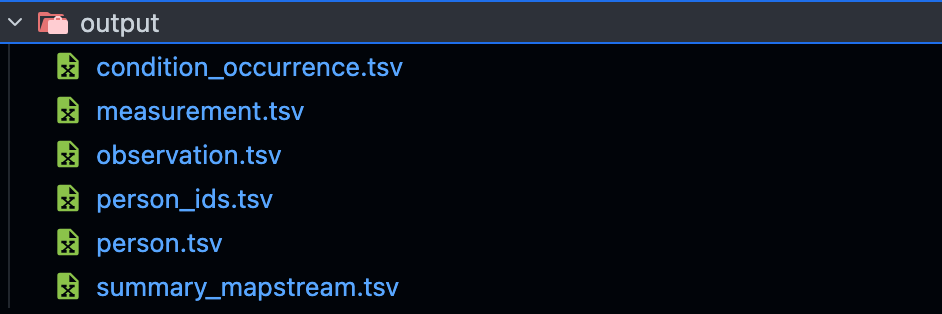
Figure: Generated Transform Output Files
Note: The basic examples don’t mount any volumes, so output files will be written inside the container and will be lost when the container exits. The examples with volume mounts add -v $(pwd)/output:/app/output (for V1) or -v $(pwd)/output:/app/build (for V2) to mount the output directory, allowing you to access the transformed files in the output directory on your host machine.
At this point, you have successfully run the transform with Docker. You can now use the output files in the output directory on your host machine.
You can go ahead and customize this to use your own files. To do this, edit the input and output directories in the command to point to your own files.
Clean up
docker ps -aThis will list all containers. To remove a container, use:
docker rm -f <container_id>To remove the images, run:
docker rmi -f ghcr.io/health-informatics-uon/carrot/transform:edgeAdditional Resources
- Quickstart Guide - For local installation and usage
- Transform Output to MinIO - Transforming data from Postgres to MinIO using Docker
- Database Connection - For connecting to databases from the container
- Expected Output - Understanding the transformation results